📌 현재 시점에서 스펙
Spring Boot 2.6.1
Java 8
Eclipse 2021-03
MySQL - AWS 연결
Thymeleaf 써서 프론트까지 잘 보이게 하는건 X
오로지 백엔드쪽만 일단 마무리
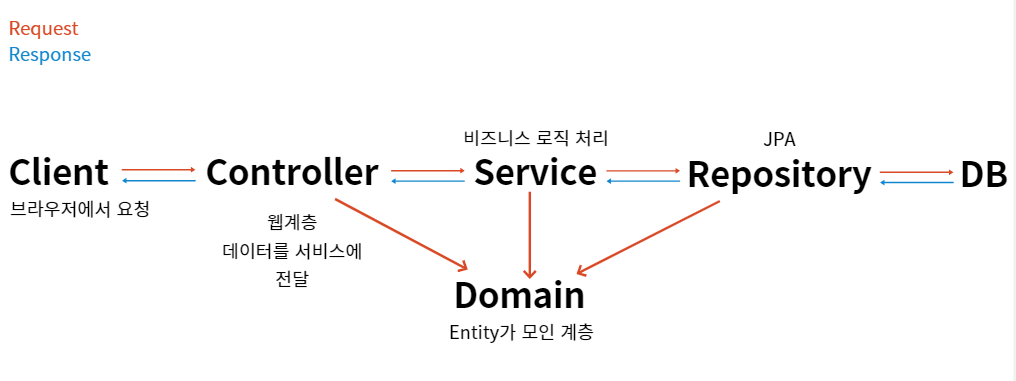
0. 구조 및 개념 정리
계속 추가할 예정
1. 프로젝트 생성
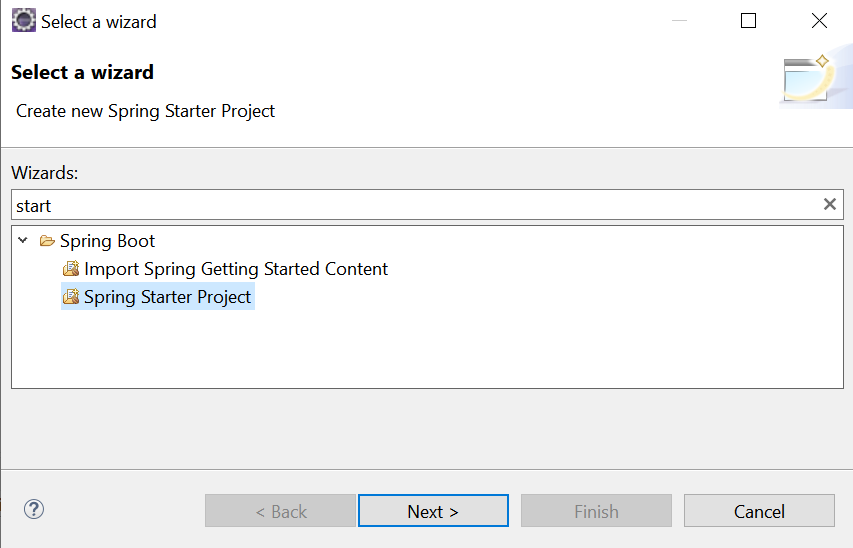
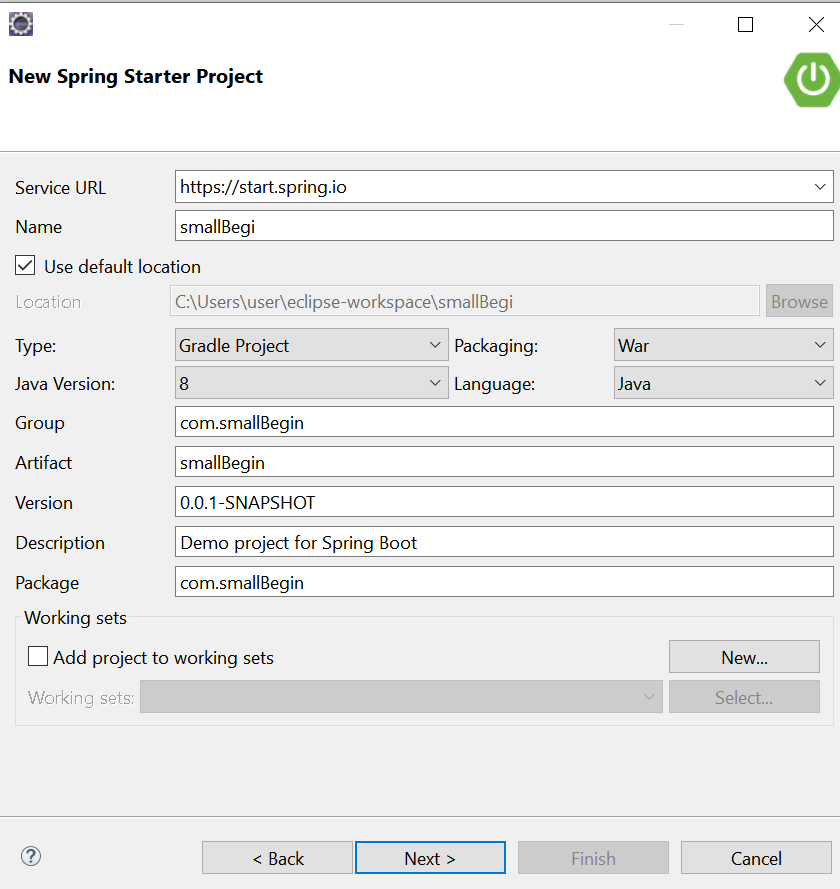
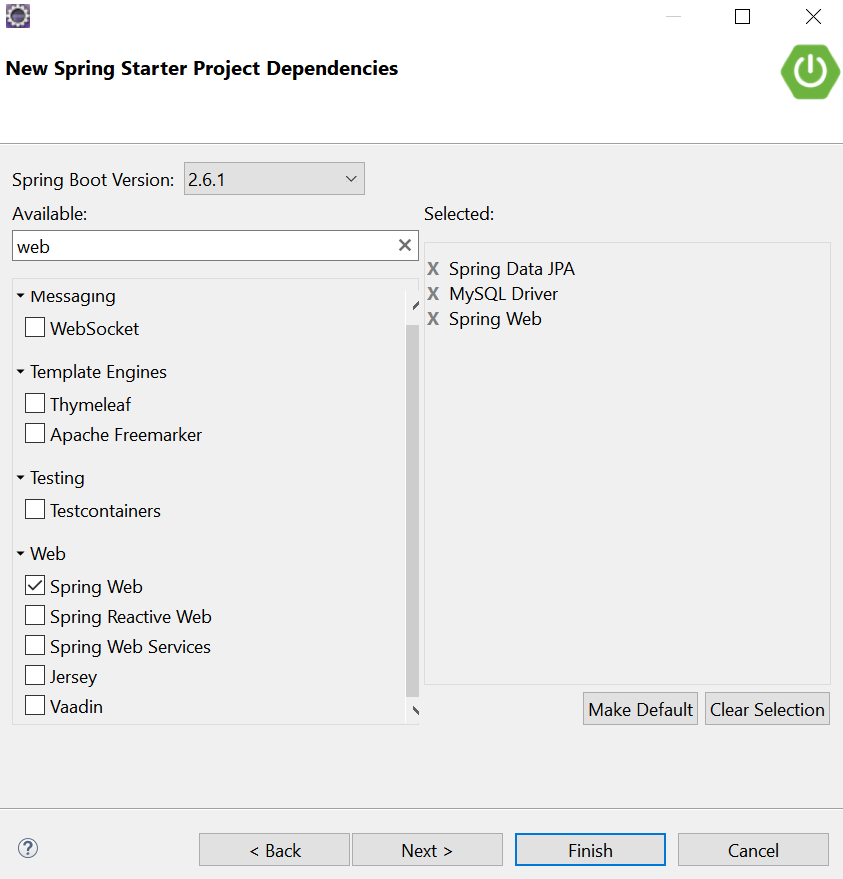
그래들 프로젝트로 만들어서 의존성 주입도 직접 할까 했으나
인텔리제이도 쓸지 모른다는 생각 + 어차피 할꺼 인텔리제이가 대세라니까 공부하자는 협의로
스프링 부트와 AWS로 혼자 구현하는 웹 서비스를 보며 같이 공부할 것 같다.
정리하다보니 Jar와 War 파일 차이점 좀 더 공부해야겠다.
누가 물어보면 차이 잘 설명도 못하겠네..
이미 필요한 의존성은 다 넣었으니 build.gradle에 추가할 필요는 없다.
2. application.properties 설정
AWS 인스턴스와 스프링부트 연결 설정 맞추기

spring.datasource.driver-class-name=com.mysql.cj.jdbc.Driver  //드라이버 설정

spring.datasource.url=jdbc:mysql://엔드포인트:3306/DB명
spring.datasource.username=이름
spring.datasource.password=비밀번호
spring.jpa.hibernate.ddl-auto=update
spring.jpa.show-sql=true

server.port=8000
비밀번호 이후는 꼭 필요한 내용이 아니다. 자동 업데이트 관련, sql문 잘 보이게 하기, 포트 번호 변경이다.
3. Domain 생성
즉 JPA에 필요한 Entity를 생성한다.
결국은 테스트로 쓸 테이블을 JPA에서 구동되게 만들어준다(DB와 똑같이)
테스트에 사용할 category 테이블

(1) 먼저 Domain Package 생성 뒤 Category.java 클래스 파일 생성한다.
(2) 본격적으로 클래스 파일을 Entity로 사용하기 위해 Annotation을 추가한다.
@Entity DB에 있는 테이블과 1:1 매칭되게 함.
@Table(name="테이블명") 맵핑할 테이블 지정. DB에 있는 테이블 명과 동일하게 입력
@Id primary key값 JPA가 객체를 관리할때 쓴다(식별하기 위해)
@GeneratedValue(strategy = GenerationType.원하는 타입설정)
GenerationType.타입 4가지
- AUTO(default):JPA 구현체가 자동으로 생성 전략을 결정
- IDENTITY : 기본키 생성을 데이터베이스에 위임. 예를 들어 MySQL의 경우 AUTOINCREMENT를 사용하여 기본키를 생성(난 안씀)
- SEQUENCE: 데이터베이스의 특별한 오브젝트 시퀀스를 사용하여 기본키를 생성
- TABLE_: 데이터베이스에 키 생성 전용 테이블을 하나 만들고 이를 사용하여 기본키를 생성
@Column(name="칼럼명")해당 멤버 변수와 테이블에 있는 칼럼을 매핑시킴
(3) @Column으로 멤버 변수 생성 뒤 테이블에 있는 칼럼들과 매핑
(4) 인스턴스에 할당된 변수 초기화를 위해 생성자 형성
	public Category() {
		super();
		// TODO Auto-generated constructor stub
	}

	public Category(int category_code, String category_name, String cateogory_color) {
		super();
		this.category_code = category_code;
		this.category_name = category_name;
		this.cateogory_color = cateogory_color;
	}
(5) getter, setter 생성
데이터 가져오기(getter), 데이터 설정(setter)
	public int getCategory_code() {
		return category_code;
	}

	public void setCategory_code(int category_code) {
		this.category_code = category_code;
	}

	public String getCategory_name() {
		return category_name;
	}

	public void setCategory_name(String category_name) {
		this.category_name = category_name;
	}

	public String getCateogory_color() {
		return cateogory_color;
	}

	public void setCateogory_color(String cateogory_color) {
		this.cateogory_color = cateogory_color;
	}
(6) toString() 생성
	@Override
	public String toString() {
		return "Category [category_code=" + category_code + ", category_name=" + category_name + ", cateogory_color="
				+ cateogory_color + "]";
	}